A real 3PL integration touches operational processes, business systems, data standards, and an external partner's technology all at once. Get one piece wrong and the rest wobbles.
This isn't a project for the IT team alone. Successful integrations draw in operations leaders, warehouse managers, software administrators, finance, customer service, and the 3PL's own implementation contacts. Each group owns a piece of the puzzle.
Skip the planning and the symptoms show up fast: inventory counts that don't match, duplicate or missing orders, shipment updates that arrive a day late, and warehouse staff doing manual rework because nobody agreed who owns an exception.
This guide walks through preparing for, building, testing, and maintaining a 3PL integration, from data mapping through go-live and beyond.
Key Takeaways
- 3PL integration automates the exchange of operational data between your business and your logistics provider
- Success depends on compatible technology and clearly documented warehouse and fulfillment processes
- Map your data, choose a connection method, test real scenarios, then monitor agreed KPIs before going live
- APIs, EDI, direct connections, file transfers, and middleware each have a place depending on your systems
3PL Integration Guide
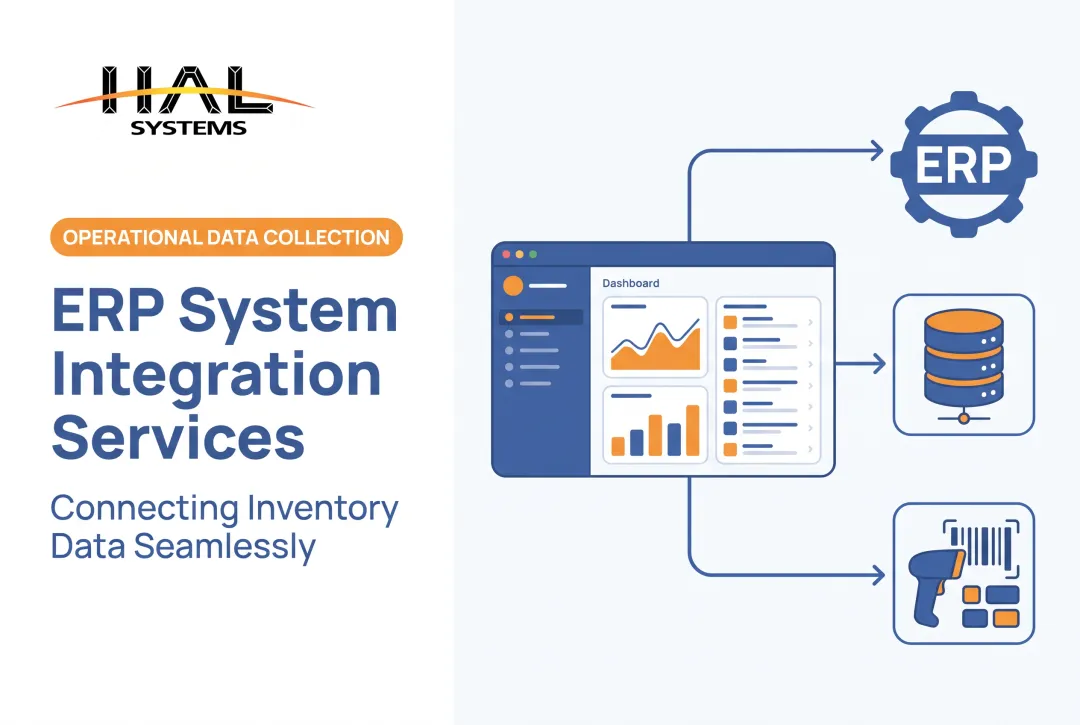
3PL integration connects your core business systems with the technology your third-party logistics provider runs. That usually means linking an ERP, WMS, inventory platform, order management system, ecommerce channel, shipping software, or accounting system to the 3PL's stack.
The typical flow looks like this: an order or inventory transfer is created in your system, fulfillment instructions pass to the 3PL, warehouse activity updates inventory and shipment status, and confirmation data flows back into your business systems.
Done well, integration delivers:
- Fewer manual handoffs between your team and the warehouse
- Better inventory visibility across locations and owners
- Faster detection of exceptions like short shipments or damaged goods
- More consistent warehouse execution across shifts and clients
- Cleaner reporting for finance and operations
None of that happens automatically. Scope can range from a single inventory feed to a full connection covering orders, receiving, shipping, returns, billing, and performance reporting. Pick the scope that matches what your business actually needs this year, not a theoretical end state three years out.
Connection Methods and System Options
There's no single "best" way to connect to a 3PL. The right method depends on your existing systems, the 3PL's capabilities, transaction volume, compliance requirements, and how much custom workflow you need.
| Method | Best for | Trade-offs |
|---|---|---|
| API | Near-real-time inventory, order, and shipment updates | Both sides need to maintain compatible endpoints |
| EDI | Standardized trading-partner documents (940, 943, 944, 945, 846) | Strong for structured transactions, less flexible for custom fields |
| Direct system connection | Compatible databases on both sides | Tighter coupling can mean more maintenance when either system changes |
| Secure file transfer | Batch updates like end-of-day inventory files | Simple to set up, but introduces processing delays |
| Middleware | Translating between formats or connecting multiple partners | Adds a layer to manage, but reduces point-to-point complexity |
EDI tends to fit standardized documents like warehouse shipping orders or inventory advice. APIs tend to fit situations where you need inventory or order status closer to real time. Neither is automatically faster or more reliable; it depends entirely on how each side configures it.
Configurable platforms can narrow the gap between these options. HAL Traxx, for example, handles warehouse management, inventory control, and barcode-driven workflows. Its in-house programmers build interfaces using APIs, ODBC, EDI, or transfer files depending on what the business and its trading partners already run. That flexibility matters more than chasing one specific protocol.
Prerequisites and Data Requirements
Before any developer writes a line of integration code, document the data your systems will exchange:
- Item and SKU masters, including any cross-reference between your codes and the 3PL's
- Units of measure, down to each-to-case-to-pallet conversions
- Locations, customers, and carriers
- Order statuses and inventory statuses
- Lot, date, or serial requirements
- Return codes and disposition rules
Item and location master data should be maintained and communicated by the business that owns the relationship with the warehouse, not assumed to match automatically on both sides, per GS1's logistics standard. Skip that step and a mismatched unit of measure can quietly turn a correct order into a mis-pick.
Assign an owner for every data element and transaction. Who creates orders? Who updates inventory counts? Who confirms shipments? Who resolves a discrepancy when the numbers don't match? Write the names down, not just the roles.
Then check system readiness on both sides:
- Available APIs, EDI specifications, or supported file formats
- Authentication requirements and data field limits
- Update frequency and batch windows
- Sandbox or test-environment access
Don't move to production without:
- Agreed data definitions for every shared field
- Security controls both parties have reviewed
- Documented exception-handling rules
- Test records covering normal and abnormal scenarios
- A rollback procedure
- Named contacts on both sides
Tools and Supporting Materials Required
Beyond people and data decisions, you'll need practical resources on hand:
- System documentation and API or EDI specifications
- Data-mapping worksheets
- Sample transactions and test credentials
- Current inventory files
- Process maps for each workflow
- An issue-tracking method, even a shared spreadsheet, as long as someone owns it
Optional accelerators can speed things up without being mandatory: prebuilt connectors, middleware, barcode equipment, dashboards, or integration-monitoring tools.
Substitutes are fine in a pinch. What shouldn't survive into production is an undocumented spreadsheet nobody maintains, a manual email approval chain only one person remembers how to run, or inventory data with no named owner. Those gaps tend to surface later as reconciliation headaches, not upfront warnings.
How to Integrate With a 3PL Step-by-Step
The sequence runs discovery, design, configuration, testing, phased launch, and ongoing optimization. Skipping discovery to save time almost always creates rework later, usually right when you can least afford it.
- Define business objectives and scope. Are you trying to improve inventory accuracy, automate order release, support multiple warehouses, track returns, or give 3PL clients separated stock visibility? Write the goal down before touching a system.
- Map current and future workflows. Trace the path from purchasing or order creation through receiving, putaway, picking, packing, shipping, invoicing, returns, and reconciliation. Note where the process breaks today.
- Choose the connection architecture and document every integration point. For each one, record the message direction, what triggers it, required fields, the expected response, the error state, the retry rule, and who owns it.
- Configure mappings, business rules, permissions, and notifications. This is where SKU codes, units, statuses, and location identifiers get translated between your system and the 3PL's, since they rarely match natively.
- Test using realistic scenarios, not just the happy path:
- Normal orders and partial shipments
- Backorders and cancellations
- Damaged goods and inventory adjustments
- Returns and duplicate messages
- Rejected transactions and communication outages
- Launch in a controlled manner. Roll out by warehouse, client, product group, or transaction type. Keep a documented fallback process ready, and review results before expanding further.

Each step depends on the one before it. A business that jumps straight to configuration without mapping workflows usually ends up redoing the mapping work mid-project, just under more pressure.
HAL Traxx, for instance, builds workflows around the order in which operations actually happen rather than forcing a fixed programmer-defined sequence. Teams can also set business-partner rules tied to specific contracts, which matters when different 3PL clients need different handling under one roof.
Post-Integration Checks and Validation
A green checkmark on your test dashboard doesn't mean the integration works. Technical connectivity and operational correctness are two different questions, and conflating them is one of the most common integration mistakes.
Data checks: Confirm item counts, locations, order identifiers, quantities, statuses, timestamps, and shipment references match across both systems.
Functional checks: Validate each workflow end to end:
- Receiving and allocation
- Picking and shipping confirmation
- Inventory adjustments
- Returns processing
- Billing
- Operational reporting
A healthy integration shows a few consistent signs:
- Transactions complete without manual intervention
- Inventory balances stay consistent across systems
- Errors are traceable to a specific cause
- Acknowledgments arrive on time
- Reports are actually usable by the people who need them
Before calling it done, get sign-off from named approvers on both sides, document production-readiness, assign monitoring ownership, and set a post-launch review schedule, maybe 30 and 90 days out.
Skipping this step doesn't usually cause an immediate crash. It tends to show up weeks later as a customer complaint, an inventory discrepancy nobody can trace, a billing dispute, or warehouse staff quietly doing manual rework to cover for a gap nobody documented.
Common Integration Problems and Fixes
Most 3PL integration problems fall into a handful of predictable categories. Here's how to spot each one and fix it before it becomes a pattern.
Data doesn't match between systems
Problem: SKU, location, unit-of-measure, quantity, or status values differ between your business and the 3PL. Data mismatches aren't rare; roughly half of 3PLs name data quality as a top challenge in partner data sharing, according to the 2024 3PL study.

Likely cause: Incomplete master-data mapping, unclear ownership, or inconsistent update rules.
Fix:
- Establish a controlled master-data process
- Map transformations explicitly
- Reconcile records regularly
- Test edge cases before production rather than after
Orders or updates are delayed, duplicated, or missing
Problem: A transaction never arrives, gets processed twice, or sits stuck in an intermediate status.
Likely cause: Failed authentication, unstable endpoints, gaps in duplicate-message handling, timeout settings, or missing acknowledgment logic.
Fix:
- Add monitoring, transaction IDs, and acknowledgments
- Set retry and reconciliation rules with alerting
- Document a manual fallback for when the system is down
The integration works technically but fails operationally
Problem: Data transfers successfully, but warehouse staff can't actually execute the resulting workflow, or nobody knows how to handle the exceptions that come up.
Likely cause: Process mapping that focused only on software fields and skipped physical handling, user roles, training, or escalation paths.
Fix:
- Run user acceptance testing with warehouse and customer-service teams
- Document standard operating procedures and train the people affected
- Review exceptions after launch, not just before it
Security, access, or compliance requirements are unclear
Problem: Teams can't say who may access data, how it's transmitted, or how activity gets audited.
Likely cause: Security responsibilities were never defined in the project scope or the partner agreement.
Fix:
- Document access roles, authentication, encryption, audit logging, retention, and incident response
- Have qualified security or compliance personnel verify the approach before launch
Pro Tips for Successful 3PL Integration
A few practices separate integrations that stay stable from ones that need constant firefighting.
- Start small and expand later. Build the smallest complete workflow that delivers real operational value, then add scope once the data, process, and support model have proven stable.
- Keep a shared integration brief. Record systems, owners, transaction definitions, field mappings, testing status, open issues, and approval decisions in one place both sides can reference.
- Design exception handling before launch, not during it. Decide who investigates inventory variances, rejected orders, missed acknowledgments, shipment discrepancies, and failed messages.
- Review KPIs jointly with your 3PL. Track inventory variance, order accuracy, fulfillment cycle time, shipment status timeliness, integration uptime, and unresolved exceptions. WERC's 2025 survey is a solid scorecard baseline.
- Bring in a specialist when complexity is high. Legacy systems, multi-client warehouses, work-in-process tracking, multiple 3PLs, or limited in-house expertise all raise the stakes. HAL Systems, for example, pairs configurable software with in-house programming and system integration for cloud or on-premises deployment.
- Schedule ongoing reviews. Products change, warehouses change, carriers change, APIs get updated. An integration that worked at launch needs maintenance as those pieces shift.

Conclusion
3PL integration is a business-process project that happens to run on technology, not just a wire between two applications. Treating it as a quick technical task is how inventory mismatches and manual rework creep in.
Define your goals, document the data and workflows, test realistic scenarios, launch in a controlled way, and assign ownership for ongoing monitoring. None of that is optional if you want the integration still working smoothly a year from now.
Get the approach right, and you'll see better visibility and fewer manual errors, while keeping room to adapt as your warehouse, inventory, manufacturing, or fulfillment needs change.
Frequently Asked Questions
What does 3PL stand for?
3PL stands for third-party logistics. It refers to an external provider that may manage warehousing, inventory, fulfillment, transportation, shipping, or returns for another business.
What is 3PL vs 4PL in logistics?
A 3PL performs or manages specific logistics services, such as warehousing or fulfillment. A 4PL typically coordinates multiple logistics providers, systems, and broader supply-chain activities on a client's behalf.
What is an example of a 3PL?
A manufacturer might use a 3PL to store its products, receive orders electronically, pick and pack shipments, and send inventory and tracking updates back to the manufacturer's system.
How does 3PL integration work?
An ERP, WMS, ecommerce, inventory, or order-management system exchanges order, inventory, shipment, receiving, and return data with the 3PL through an API, EDI, file transfer, or another connection method agreed upfront.
What systems can integrate with a 3PL?
Common systems include ERP, WMS, inventory management, ecommerce, marketplace, order management, shipping, accounting, manufacturing, and customer-service platforms. Compatibility still needs to be checked case by case.
How long does 3PL integration take?
Timing varies with system complexity, data quality, number of workflows, connection method, testing requirements, and how responsive your partner is. Build a project plan rather than assume a fixed timeline.