That gap between when inventory moves and when the system knows about it costs real money. Inventory distortion, meaning out-of-stocks and overstocks combined, reached $415 billion in North America last year, according to IHL's 2025 report.
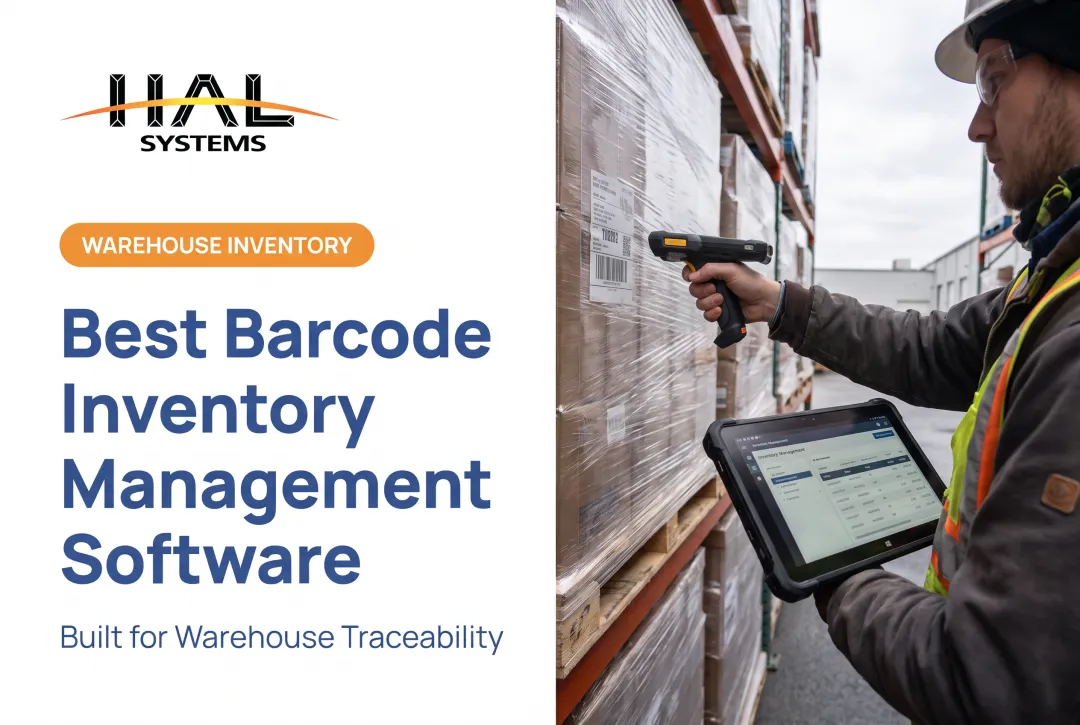
Mobile inventory software closes that gap. Instead of writing down a count and entering it later, workers scan, receive, transfer, and verify stock right where the work happens. The data hits the central database the moment the transaction occurs, not hours afterward.
This guide compares five widely used options for different US business needs, then walks through how to evaluate mobile usability, integrations, scalability, and true total cost before you commit to a contract.
Key Takeaways
- The right mobile inventory software depends on your workflows, locations, user count, and existing business systems, not brand recognition.
- Prioritize barcode or QR scanning, real-time updates, offline capture, multi-location control, and role-based permissions.
- Validate actual mobile workflows and device compatibility yourself; don't rely on a vendor's marketing page alone.
- Implementation support and hardware costs often matter more than the advertised subscription price.
- Offline functionality varies dramatically between products, so test it before you buy.
Overview of Mobile Inventory Management Software in the US Market
Mobile inventory management software uses smartphones, tablets, mobile computers, or dedicated scanners to record and retrieve inventory data, syncing those transactions to a central database in real time. It replaces the lag between a physical stock movement and a digital record of that movement.
In practice, that covers a lot of ground:
- Receiving and put-away at the dock
- Picking, packing, and shipping orders
- Cycle counts and full physical inventories
- Stock transfers between warehouses or bins
- Replenishment triggers and reorder alerts
- Asset check-in/check-out for tools and equipment
- Manufacturing material movement and work-in-process tracking
- Field or job-site inventory for contractors and service teams
Done well, this produces fewer manual entry errors, faster transactions, better accountability, and purchasing or production decisions based on what's actually on the shelf, not what a spreadsheet says was there last Tuesday.
Businesses relying on manual tracking or spreadsheets aren't a small minority, either: 34% still track inventory manually and 24% use spreadsheets, according to Capterra's 2026 research.

Native App, Web Dashboard, or Companion App?
Not every product labeled "mobile" works the same way:
- Native mobile-first apps are built for phones and tablets first, with full transaction capability on-device.
- Responsive web dashboards display reasonably well on mobile browsers but weren't designed around scanning or warehouse motion.
- Companion apps handle a narrow slice of tasks (like lookups) while core functions stay desktop-only.
As you'll see below, several products split functionality across these categories, meaning a feature that sounds "mobile" might actually require a laptop.
Best Mobile Inventory Management Software Options
The five products below serve different business profiles, from ecommerce sellers to manufacturers to asset-heavy field operations. Features and pricing change regularly, so verify current claims directly with each vendor before making a decision.
Sortly
Sortly fits teams that want straightforward visual inventory or fixed-asset tracking without a steep learning curve. Think maintenance departments, field service crews, and small warehouses tired of spreadsheets.
Its mobile apps (iOS and Android) support barcode and QR scanning, item photos, and custom fields including dropdowns and file attachments. Offline mode updates inventory levels directly on the device; those changes push to the server and other users once connectivity returns.
Other notable details:
- Twelve custom field types, though date/time and attachment fields require Ultra, Premium, or Enterprise plans
- Custom user roles control who can add, edit, or delete items
- QuickBooks Online export is limited to Premium and Enterprise tiers
- API and webhook access require the Enterprise plan
Pricing starts free for one user and 100 items, scaling to $299/month for Premium (5,000 items, 8 users), with Enterprise priced by quote.
One Capterra reviewer in the furniture industry noted the platform lacks dedicated cycle-counting and pick-list reservation tools. Confirm those capabilities if your operation needs them specifically.
Best for: small teams, field service, and fixed-asset tracking where simplicity matters more than deep warehouse logic.
Zoho Inventory
Zoho Inventory lives inside the broader Zoho ecosystem, making it a natural fit for growing ecommerce, retail, or wholesale businesses already using Zoho Books or Zoho CRM.
The mobile app (Android/iOS) handles item and batch scanning, SKU creation, serial and batch tracking, picklists, and shipment tracking. On the warehouse side, barcode-assisted receiving, picking, transfers, and adjustments compare physical counts against system records in real time.
Integration coverage includes:
- Ecommerce: Shopify, Amazon
- Accounting: Zoho Books, QuickBooks
- CRM: Zoho CRM
- Shipping: UPS, FedEx, EasyPost
US pricing runs from free (50 orders/month, 1 user, 1 location) up to $249/month for Enterprise (15,000 orders, 10 users, 10 locations). Note that "locations" in Zoho's pricing doesn't guarantee separate full warehouses. A Capterra reviewer praised the consolidated order and shipment tracking but flagged frustration with feature gates on lower tiers.
Best for: multichannel sellers already invested in, or considering, the Zoho suite.
inFlow Inventory
inFlow targets small and mid-sized distributors, wholesalers, retailers, and light manufacturers moving beyond spreadsheets but not ready for an enterprise WMS.
The mobile app handles purchase-order receiving (including partial receipts), barcode-assisted picking, and stock adjustments from an iPhone or iPad. Here's the catch: inFlow's own documentation states that dedicated Stock Counts are a web-only feature. Mobile users can adjust stock but can't run a formal cycle count from their phone.
Integration allowances (Shopify, Amazon, WooCommerce, Xero, QuickBooks Online, Zapier) count toward plan limits, and API access is a paid add-on.
Plans range from Entrepreneur (2 members, 1 location, no sublocations) to Mid-size (10 members, unlimited locations, 5,000 monthly orders). All paid onboarding is mandatory and billed separately: a $499 one-time charge on Small Business and Mid-size plans, on top of the subscription itself.
Best for: small distributors and wholesalers who need solid receiving and picking workflows but can live with web-only counting.
Cin7
Cin7 targets multichannel commerce and distribution businesses juggling several sales and fulfillment channels at once. The company sells two distinct products (Core and Omni), and pricing for Omni requires a custom quote, so don't assume Core's published rates apply to both.
Core's mobile warehouse tools cover device-camera or connected-scanner receiving (with or without a PO), bin put-away, guided picking, packing, and physical stocktakes. One important limit: Cin7 Core explicitly states that stock lookup does not work offline, so plan connectivity accordingly on the warehouse floor.
Core pricing runs:
| Plan | Price/month | Users | Sale orders/year |
|---|---|---|---|
| Standard | $349 | 5 | 6,000 |
| Pro | $599 | 10 | 24,000 |
| Advanced | $1,199 | 15 | 120,000 |

Implementation involves group onboarding or 1-to-1 partner-led setup, and connecting Shopify or Xero requires configuring chart-of-accounts, tax rules, and location mapping beforehand. A reviewer in the medical device industry praised the onboarding help; another flagged slow bug resolution.
Best for: multichannel distributors needing real warehouse depth, provided connectivity is reliable.
Odoo Inventory
Odoo Inventory suits businesses that want inventory functionality bundled with manufacturing, purchasing, sales, or accounting apps inside one modular platform.
Odoo recommends its progressive web app over native store apps for barcode operations, covering receipts, deliveries, and transfer validation via scanner or mobile browser. Configurable routes handle multi-step warehouse logistics, and lot/serial reporting traces goods from supplier to customer.
Offline behavior is conditional, not absolute. According to Odoo's own documentation, offline mode only tolerates short interruptions: previously opened records can still be edited, but new records require an existing internet connection to create that record type first. Changes queue locally and sync once reconnected.
Pricing starts with One App Free (unlimited users, single app), moving to paid Standard or Custom plans for full-suite access. Implementation, Studio customization, and Odoo.sh hosting sit outside the subscription price. One reviewer reported spending CAD$48,000 on implementation alone, an outlier rather than a typical cost.
Best for: businesses wanting inventory tied tightly into manufacturing and accounting, with budget for configuration.
Quick Comparison
| Product | Starting price | Offline mobile support | Best fit |
|---|---|---|---|
| Sortly | Free – $299/mo | Yes, inventory levels | Small teams, assets |
| Zoho Inventory | Free – $249/mo | Not documented | Multichannel ecommerce |
| inFlow | Custom (+ $499 setup) | Not documented | Small distributors |
| Cin7 Core | $349 – $1,199/mo | No (stock lookup) | Multichannel distribution |
| Odoo Inventory | Free – custom | Conditional, short gaps only | Manufacturing + full suite |
How We Chose the Best Mobile Inventory Management Software
This comparison draws on verified product documentation, current vendor pricing, and independent customer feedback, not marketing copy or popularity rankings.
Mobile execution mattered most. We looked at barcode and QR scanning, camera versus hardware-scanner support, receiving, picking, counts, transfers, photo capture, and, critically, whether offline data capture actually syncs once connectivity returns.
Inventory control depth came next:
- Real-time quantity and location updates across multiple warehouses
- Lot and serial tracking
- Reorder points and demand planning
- Kitting, assemblies, and work-in-process tracking
- Asset check-in/check-out and audit trails
Connectivity and data architecture decide whether a product fits into an existing tech stack or creates a new silo. We checked for ERP, accounting, ecommerce, POS, and shipping integrations, along with API, ODBC, and file-transfer options. Poor integration here just recreates the duplicate-entry problem mobile software is supposed to solve.
Why does scanning technology matter this much? GS1 US and VDC Research modeled a $515,492 annual benefit per facility for 2D-dominant barcode operations over 1D-dominant ones, driven largely by fewer rescans and shipment errors, according to GS1 US's 2025 study. That figure is a logistics-wide model, not a guarantee for any specific product. It still underlines how much scanning depth matters in day-to-day operations.

Finally, we weighed practical ownership factors: implementation services, training, device compatibility, security and permissions, support availability, deployment model, and total cost of ownership including hardware.
Common mistakes to avoid:
- Choosing a desktop-first system with a bolted-on mobile interface
- Overlooking offline requirements until you're standing in a dead zone on the warehouse floor
- Testing connectivity in the office instead of where work actually happens
- Ignoring unusual workflows that don't fit the vendor's default setup
- Comparing subscription prices without factoring in implementation and hardware costs
Conclusion
The best mobile inventory management software is the one that captures accurate data where the work actually happens, then connects that information to purchasing, production, fulfillment, and accounting decisions. A polished demo doesn't prove that.
Before signing anything, test representative workflows with real devices, real labels, real scanners, and the connectivity conditions you'll actually face (not just a strong Wi-Fi signal in a conference room). Then weigh these factors against what the contract actually promises:
- Scalability as your locations and SKU count grow
- Reporting depth for purchasing, production, and fulfillment decisions
- Support responsiveness when floor operations stall
- Long-term cost beyond the initial license or subscription
For organizations needing inventory, warehouse, asset-tracking, or manufacturing workflows that don't fit a one-size-fits-all mold, HAL Systems' configurable HAL Traxx platform is worth a look.
It's built from software blocks you can add, remove, or rearrange without custom code, and it runs in a browser on handhelds, tablets, and smartphones across Windows, iOS, Android, or Linux. Confirm HAL Traxx's current mobile capabilities, integrations, and deployment options directly with HAL Systems to see whether it fits your implementation needs.
Frequently Asked Questions
What is mobile inventory management software?
It's software that lets teams use phones, tablets, or scanners to capture, update, and view inventory information, typically through barcode or QR scanning connected to a central database. This replaces delayed desktop entry with real-time, on-site transactions.
What features should the best mobile inventory software include?
Look for barcode scanning, real-time updates, multi-location control, offline capability, reporting, integrations, role-based permissions, and audit trails. The right mix depends on your specific industry and workflows.
Can mobile inventory software work offline?
Offline support varies by product: some sync automatically after reconnection, others don't support it at all. Always test scanning, counts, and transaction handling without a connection before committing.
How does mobile inventory software integrate with ERP or accounting systems?
Most products connect through APIs, ODBC, native connectors, or file transfers. Synchronized records across inventory, purchasing, sales, and finance prevent duplicate data entry and conflicting numbers.
Is mobile inventory software suitable for manufacturing and field service?
Manufacturers typically need material, work-in-process, lot, and bill-of-materials tracking. Field teams need equipment, job-site, and vehicle tracking with reliable offline workflows for low-connectivity locations.
How do I choose the best mobile inventory management software?
Document your actual workflows, test mobile tasks on real devices, confirm integrations and offline support, and compare total ownership costs, not just subscription price. Factor in implementation, training, and long-term scalability before deciding.