Many operations struggle with disconnected processes instead. Inventory records drift from physical stock. Pickers walk extra aisles because slotting hasn't been reviewed in years. Data gets keyed in twice, by hand, with room for error each time. Handoffs between receiving, storage, and fulfillment teams go undocumented until something breaks.
A 2024 industry survey found that 93% of warehouses use some form of WMS, yet 44% still rely on paper-based picking, according to Modern Materials Handling's 2024 survey. Software adoption alone doesn't fix broken workflows.
This article breaks down the seven core warehouse processes, walks through an example workflow, covers layout and technology considerations, and ends with a practical improvement plan for US warehouse teams.
Key Takeaways
- Effective operations connect receiving, storage, inventory control, fulfillment, shipping, and returns into one traceable workflow
- Accuracy depends on clear ownership, standard procedures, barcode identification, and timely data capture
- Layout, slotting, safety, and exception handling should be designed around how people and materials actually move
- Configurable software improves visibility without forcing every business into an identical workflow
The 7 Key Processes Involved in Warehouse Operations
Most warehouse operations break down into seven connected processes. The exact steps vary by facility, product type, industry, and operating model, but according to ASCM's warehouse management guide, each process should have a defined input, action, verification point, and handoff to the next stage.
Receiving
Receiving covers scheduling inbound shipments, unloading, counting, inspecting, identifying, and recording goods against purchase orders, advance shipping notices, or transfer documents.
Discrepancies, damage, and lot or serial information need to be recorded before inventory becomes available for picking. Skip this step, and a damaged pallet might get picked for an order before anyone notices it's unusable.
What should happen at receiving:
- Verify quantities against the PO or ASN before accepting
- Inspect for visible damage and document it with notes or photos
- Capture lot, serial, or batch numbers for traceable items
- Flag unidentified or unexpected items for review, not automatic stocking
Putaway and Storage
Putaway assigns goods to locations based on dimensions, weight, handling requirements, turnover rate, environmental conditions (like temperature control), and available capacity.
This step needs three things to work: clear location labeling, directed putaway rules, and a system that records the item's exact location the moment it's shelved. Without that last piece, you technically have the inventory, but nobody knows where.
Inventory Control and Replenishment
Inventory control is different from storage. It covers cycle counting, stock status, lot or serial tracking, inventory adjustments, quarantine handling, and reconciling system records against physical stock.
Replenishment moves stock from reserve storage to forward pick locations or production staging areas, ideally before shortages interrupt fulfillment. A pick face that runs empty mid-wave creates a cascading delay through packing and shipping.
Picking
Picking methods vary by order profile and warehouse layout:
- Discrete picking: one order, one picker, start to finish
- Batch picking: multiple orders picked together in one pass
- Zone picking: pickers assigned to fixed areas, orders move between zones
- Wave picking: orders released in scheduled groups by time or priority
- Production picking: components pulled for manufacturing rather than customer orders
Barcode scanning, location confirmation, and quantity verification at the point of pick reduce short picks, wrong-item picks, and the time lost searching for misplaced stock.
Packing
Packing is both a presentation step and the last accuracy checkpoint before an order leaves. It includes order verification, packaging selection, product protection, inserts or documentation, and weight/dimension checks before final labeling.
A packer who catches a wrong item here saves a return, a customer complaint, and a restocking trip.
Shipping and Dispatch
This stage covers staging, carrier selection, documentation, loading, shipment confirmation, and tracking handoff to the carrier or customer.
Keep exceptions visibly separate from ready-to-ship orders:
- Address or documentation issues
- Missing items flagged during final check
- Damaged goods discovered at staging
Orders stuck in exception status shouldn't sit mixed in with orders ready to load. That's how shipments go out wrong or get delayed at the dock.
Returns, Inspection, and Disposition
Returned goods need to be received, inspected, classified, and assigned a disposition: restock, repair, replacement, quarantine, supplier return, or disposal. According to ASCM's returns management guide, restocking is just one disposition among several, not the default outcome.
Returns data should feed back into inventory and customer or supplier records so patterns, like repeated damage from one carrier or one SKU with chronic defects, can actually be analyzed and fixed.

How to Design an Efficient Warehouse Workflow
A workflow is the sequence of tasks, decisions, people, equipment, data captures, and handoffs used to move an item from one state or location to another. That sequence covers both the physical path and the information path that runs alongside it.
Map the Physical and Information Flow
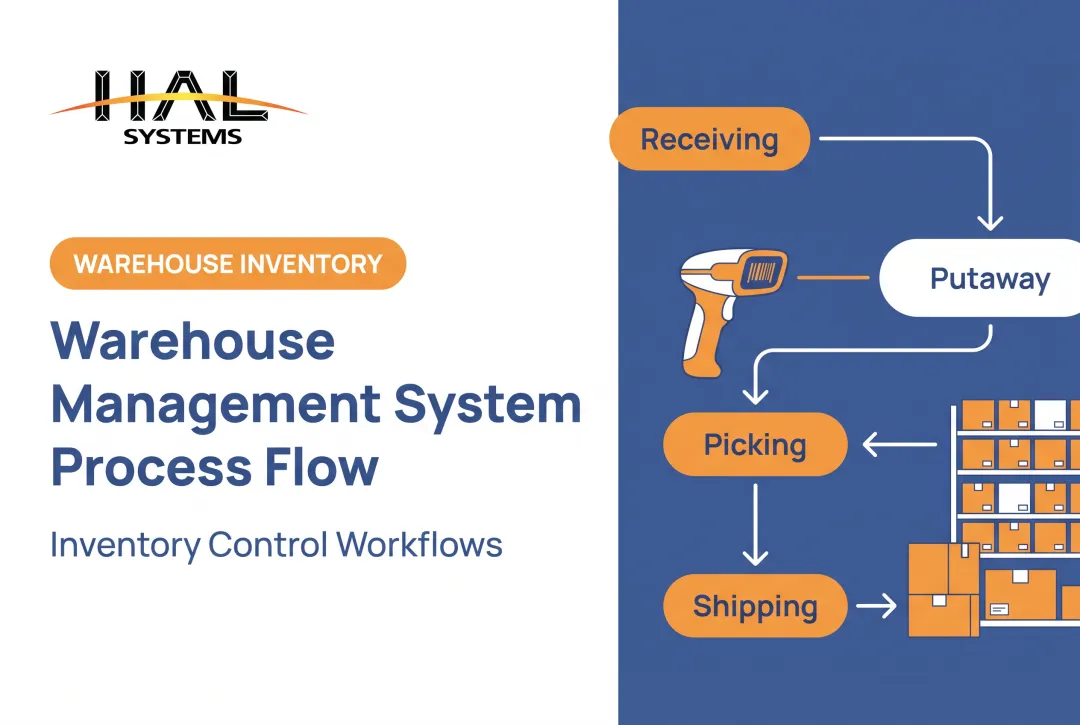
Here's a simple example: an inbound shipment arrives and gets verified against the PO. It's placed into a recorded storage location. Later, it's replenished to a pick face. A picker pulls it for an order. It's packed, shipped, and if the customer later returns it, it moves through the returns process.
At each step, the workflow map should answer:
- Who performs the task?
- What information gets captured?
- What happens when something goes wrong?
That last question matters more than most layout diagrams account for.
Design Around the Facility and Product
Warehouse layouts generally follow one of three flow patterns, according to ASEAN's logistics training materials:
| Pattern | Characteristics | Consideration |
|---|---|---|
| U-shaped | Receiving and dispatch share one side | Enables shared docks, cross-docking |
| I-shaped | Receiving and outbound at opposite ends | Longer travel distance for all items |
| L-shaped | Receiving and dispatch on perpendicular sides | Dock geometry varies by site |
No single pattern wins universally. It depends on your dock access, building shape, and how much cross-docking you actually do.
SKU velocity should drive slotting decisions. Fast movers belong close to pack-out; slow movers can sit further back. Product size, weight, temperature needs, expiration dates, and order frequency all factor in too. According to Modern Materials Handling's slotting guidance, poor slotting creates unnecessary walking, congestion, and emergency replenishment runs.

Reduce Unnecessary Movement and Bottlenecks
Look for the usual suspects:
- Travel-heavy picking routes that cross the same aisle repeatedly
- Repeated touches that handle items more times than necessary
- Dock congestion during peak receiving or shipping windows
- Queues building at packing or shipping stations
Before investing in automation or a layout overhaul, compare alternative routes, batch sizes, staffing assignments, and release schedules. Sometimes the fix is as simple as staggering wave releases by 30 minutes.
Build Safety and Exception Handling Into the Process
OSHA's standard on materials handling, 29 CFR 1910.176, requires sufficient clearances around mechanical handling equipment and marked, clear aisles. Separately, 1910.22 requires clean, orderly floors free of specified hazards.
Build these into daily operations, not just compliance checklists:
- Marked pedestrian walkways separated from equipment traffic
- Clear aisles, with damaged or quarantined inventory stored outside main pathways
- Documented procedures for shortages, overages, damaged goods, and system outages
- A defined process for urgent or rush orders that doesn't rely on someone yelling across the floor
Informal workarounds for these situations tend to become permanent, and permanent workarounds tend to create safety gaps.
Adapt the Workflow to the Operating Model
Distributors, manufacturers, 3PLs, field service companies, and public-sector asset teams all need different controls. A manufacturer tracks work-in-process stages; a 3PL tracks client ownership; a government agency tracks audit trails for fixed assets.
Multi-client warehouses have it hardest. They need separated inventory by account, client-specific fulfillment rules, and reporting that doesn't mix one customer's stock with another's. HAL Systems built this kind of flexibility into HAL Traxx, which supports configurable business rules so, for example, one 3PL client might require all orders to ship complete while another allows partial shipments, all inside the same platform.
How to Improve Warehouse Operations With Technology and Data
Technology should support a well-designed process. It shouldn't paper over unclear responsibilities or automate work that shouldn't exist in the first place.
Core Warehouse and Business Systems
Different systems handle different jobs, and they need to talk to each other:
- ERP: organization-wide framework for standardized business processes
- WMS: manages and optimizes warehouse workflows and storage
- TMS: manages transportation operations
- OMS: applies fulfillment rules and routes orders across nodes
This breakdown reflects definitions from the ASCM Supply Chain Dictionary. The operational value comes from having one reliable record for item identity, quantity, location, status, and order stage, instead of four systems with four slightly different answers.
A 2023 case covered by Modern Materials Handling described Coastal Pet Products, whose earlier ERP-based inventory updates ran in batches, leaving stock data a day behind. Integrating a WMS introduced real-time updates, cycle counting, and order-stage validation.
HAL Systems' System Integration service works on this exact problem, building interfaces through APIs, EDI, and ODBC connections that eliminate duplicate manual entry between accounting, ERP, and warehouse systems.

Identification and Data Capture
Barcodes, mobile computers, scanners, label printers, and RFID all reduce manual transcription and improve traceability. Where you place the scan points matters:
- Receiving: confirm quantity and identity against the PO
- Putaway: confirm the exact storage location
- Picking: confirm location and quantity before the item leaves the slot
- Packing: final verification against the order
- Shipping: confirm load and generate tracking
- Cycle counting and returns: confirm against system records
HAL Traxx accepts barcode, RFID, lookup, or manual input, and operations can mix these methods depending on the task rather than standardizing on one input type across every process.
Reporting and Operational Visibility
Dashboards should flag problems before they cascade: inventory discrepancies, receiving backlogs, replenishment needs, picking exceptions, and labor activity.
Metrics worth tracking and defining clearly:
- Inventory accuracy (by location, not just overall)
- Order accuracy
- Dock-to-stock time
- Picks per labor hour
- On-time shipment rate
- Storage utilization
The WERC DC Measures survey tracks 38 such metrics across the industry. Define your denominators consistently. "Picks per hour" means something different if you're counting lines versus units versus orders.
Configurable Software for Varied Warehouse Needs
HAL Traxx, a configurable platform from HAL Systems, supports warehouse management, barcode-driven inventory and asset tracking, and work-in-process control. It's built from software blocks that can be added, removed, or rearranged without custom code.
It fits organizations that need warehouse activity connected to ERP, shipping, eCommerce, accounting, or manufacturing systems through integration. Not every operation needs the same configuration, and HAL Traxx is set up for only the steps a given operation actually uses, rather than forcing a standard template.
Integration, Deployment, and Scalability
On-premises and cloud deployment both have tradeoffs around data ownership, user access, uptime, and support requirements. HAL Traxx runs either way, browser-based, with no separate application or database license required.
The bigger advantage of configurable software shows up later: when a business adds a location, a new client, a new asset type, or a new fulfillment channel, it can add that function to the existing platform instead of replacing the whole system.
A Practical Plan for Improving Warehouse Operations
Document the current state before changing anything. Map each process, record handoffs and exceptions, identify where manual data entry happens, and talk to the people actually doing the work. They know where the bottlenecks are, usually before any report shows it.
Follow this sequence:
- Pick one or two high-impact constraints: inventory discrepancies, receiving delays, excessive travel, replenishment failures, picking errors, or shipping backlogs. Don't change everything at once.
- Set a baseline: measure current performance on the specific metric tied to your constraint.
- Define ownership: assign a person responsible for the revised process, not just the software.
- Pilot the change: test on one zone, one shift, or one product line first.
- Train users: on the process, not just the screen.
- Monitor agreed KPIs: weekly at first, then monthly once stable.
- Adjust through continuous-improvement reviews: treat this as ongoing, not a one-time project.
Lean and Six Sigma methods, particularly DMAIC (Define, Measure, Analyze, Improve, Control), give structure to this process. A documented case from the Lean Enterprise Institute described a manufacturer that redesigned parts packaging and presentation, raising inventory accuracy from 60% to 99% within five months.

Those results came from solving a specific problem, not from applying the method as a guarantee.
HAL Systems' continuous-improvement work is led by an ASQ Certified Six Sigma Black Belt, and the company's team brings over 100 years of combined experience in process optimization.
HAL Systems pairs configurable software, integration support, and operational reporting with that process expertise so organizations can make warehouse workflows more visible and manageable without rebuilding everything from scratch.
Frequently Asked Questions
What are the 7 key processes involved in warehouse operations?
Receiving, putaway and storage, inventory control and replenishment, picking, packing, shipping, and returns. Exact workflows vary by facility, product type, and operating model, but each process needs a clear owner and verification point.
Can you give me an example of a workflow?
An inbound shipment is received and verified against the PO, placed into a recorded location, then replenished to a pick face when needed. It's picked for an order, packed, shipped, and if returned later, processed through inspection and disposition.
How can I improve warehouse workflows?
Map your current workflow, review layout and slotting, standardize procedures, and ensure accurate data capture at each handoff. Identify your biggest bottleneck, pilot a fix, train staff, and review KPIs regularly.
What KPIs should warehouse operations track?
Inventory accuracy, order accuracy, dock-to-stock time, order cycle time, picks per labor hour, on-time shipment rate, return processing time, and storage utilization. Define each metric's denominator consistently before comparing results over time.
What technology supports warehouse operations?
WMS or inventory software for tracking stock and orders, barcodes and scanners for data capture, and ERP or shipping integrations to keep systems synchronized. Reporting tools and automation help most when they solve a clearly defined operational problem.